logo | Help
  • Getting Started
    • How Does This Work
    • Account Opening
    • Purchasing A Plan
    • Setting Permissions
    • Redacting your first document
  • General
    • Customize date format and time zone
    • How To Upload Documents
    • Handling Audit Trails
  • Users and Teams
    • Creating A Team
    • Invite New Users
    • Inviting New Team Members
    • Inviting New Members To A Sub-team
    • Sharing Documents With Team Members
  • Productivity
    • Text Mapping
    • Redacting By Categories With AI
    • Enabling Multi-Screen
    • Quickly Find and Redact Text
  • Handling The Editor
    • Adding Object Fields
    • Resize, Remove, and Move Object Fields
    • Setting Editor Layout
    • Responsiveness of the Editor
    • Live Search Document
  • Managing Subscriptions
    • Managing Your Subscriptions
    • Cancelling Your Subscriptions
    • Updating Your Subscriptions
    • Updating Your Payment Method
  • Redact Data
    • How to Redact A Document
    • How to Redact An Email
    • Redacting Metadata
  • Managing Documents
    • Managing Your Documents

Quickly Find and Redact Text

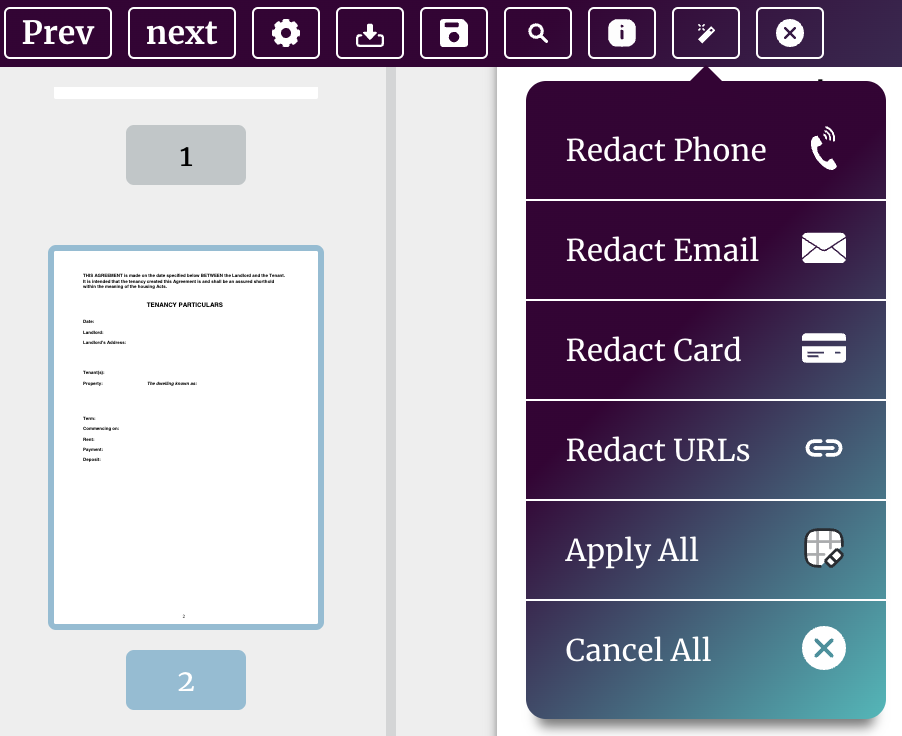
Our platform also has an advanced search tool that allows you to speed up the document redaction process, which you can access directly from your Obfys account by using the magic pen tool. Magic Pen Tool
Oour platform has OCR search capability, which allows you to search for and highlight both raw text and text within images. From the search bar, you can easily toggle through the list items returned by our algorithm, and can automatically apply redact boxes over those items that are of interest. OCR Search Document

Users can perform full text search or partial matching amking it easier to find the sensitive data even you do know the full content such as a bank account number.

site logo ©
Product
  • Pricing
  • Book A Demo
Resources
  • Help Center
  • Blog
About
  • Contact
  • Privacy
  • Terms

Simple, Flexible, and Cost Effective

Connect

  • facebook
  • facebook