logo | Help
  • Getting Started
    • How Does This Work
    • Account Opening
    • Purchasing A Plan
    • Setting Permissions
    • Redacting your first document
  • General
    • Customize date format and time zone
    • How To Upload Documents
    • Handling Audit Trails
  • Users and Teams
    • Creating A Team
    • Invite New Users
    • Inviting New Team Members
    • Inviting New Members To A Sub-team
    • Sharing Documents With Team Members
  • Productivity
    • Text Mapping
    • Redacting By Categories With AI
    • Enabling Multi-Screen
    • Quickly Find and Redact Text
  • Handling The Editor
    • Adding Object Fields
    • Resize, Remove, and Move Object Fields
    • Setting Editor Layout
    • Responsiveness of the Editor
    • Live Search Document
  • Managing Subscriptions
    • Managing Your Subscriptions
    • Cancelling Your Subscriptions
    • Updating Your Subscriptions
    • Updating Your Payment Method
  • Redact Data
    • How to Redact A Document
    • How to Redact An Email
    • Redacting Metadata
  • Managing Documents
    • Managing Your Documents

Setting Editor Layout

The layout of the editor can be modified to fit your preferences though in a somewhat limited fashion. Due to the nature of the documents we handle, we cannot not make specific changes to the look and feel of the content of the documents. The look and feel of the content of the documents are set the by the creators of the document. Nevertheless, we able to provide a few options that determines how the document flows. Using the gear icon, you can rotate the document to any angle you want. You can also determine how the document transitions from one page to the next - i.e. whether the pages flow in one continuous motion, or discretely. If you want to create more space to view content you can toggle the thumbnail in the side bar to off.
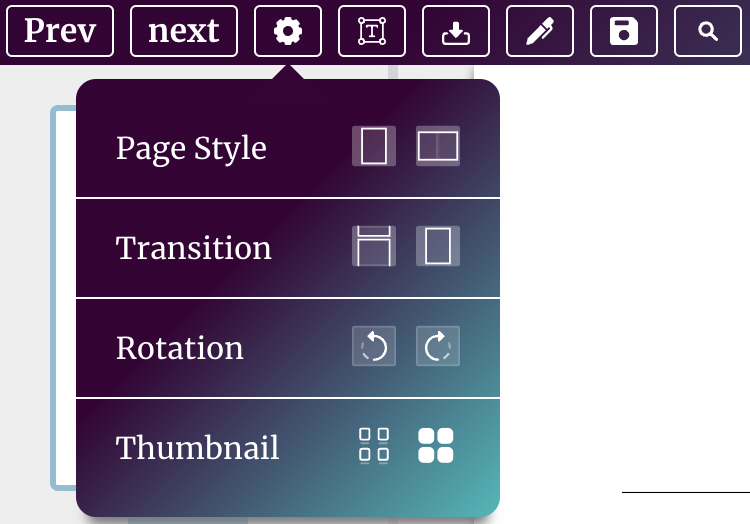
Layout Documents

You can also set the default font size, style and colour of all the object fields in the document by using the font tool. Using the same tool you can also change the font parameters of a single object field by selecting that object field before change the font parameters.
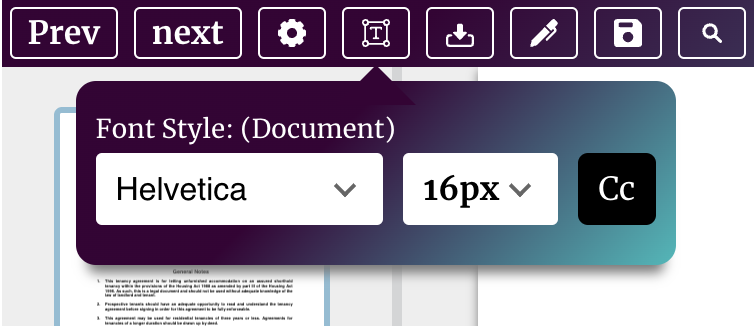
Font Styling

site logo ©
Product
  • Pricing
  • Book A Demo
Resources
  • Help Center
  • Blog
About
  • Contact
  • Privacy
  • Terms

Simple, Flexible, and Cost Effective

Connect

  • facebook
  • facebook